
Find your
perfect lap
Brake application, final turn
Brake 50m earlier and build to 85% pressure. You apply 4% where the reference is already at 41%.
iRacing telemetry,
made actionable.
Overlay any two iRacing laps and see exactly where time is gained or lost. Brake points, throttle application, steering inputs, racing lines, tire data, and delta traces are synchronized so you can turn raw sim racing telemetry into faster decisions.
- Side-by-side lap overlay
- Automatic telemetry session library
- Distance-aligned delta analysis
- 3D track map with AI markers
- Sector-by-sector breakdown
- Throttle, brake, steering, and tire traces
How Hotlap.ai finds the next tenth
Most sim racing telemetry tools show graphs. Hotlap.ai connects the graphs to driver decisions. It helps iRacing drivers understand whether time is being lost from brake points, peak brake pressure, trail braking shape, throttle timing, steering overlap, apex speed, gear choice, upshift timing, understeer, oversteer, or inconsistent line through a sector.
Sync iRacing telemetry
The desktop app scans Documents/iRacing/telemetry, groups sessions by car and track, hashes files for duplicate detection, and recovers interrupted upload jobs.
Compare against a faster lap
Overlay your lap against a personal best, theoretical best, teammate, live lap, or community reference. Delta, brake pressure, throttle, steering, gear, RPM, tire data, and map position stay aligned by distance.
Turn data into AI findings
AI analysis grades every corner from S to F, ranks the sections costing the most time, and shows your numbers against the reference — apex speed, brake point, throttle pickup — so each finding is backed by evidence.
Coaching that names the corner
Not "improve your braking." The exact turn, the exact input, and what it costs you. Every finding links back to the traces.
Braking too late, too softly
Reference applies 41% brake pressure at the start of the zone. You apply 4%, run deep, and compromise the exit onto the front straight.
Recoverable time in this sectionThrottle pickup timing
You went to throttle 25m earlier than the reference, but the eager ramp did not translate into a gain. Build to full throttle later.
0.474s lost at corner 10Turn-in: a strength
You turn in 87m earlier, carry 4.1 km/h more apex speed, and gain 0.287s. Keep this rotation approach for similar high-speed corners.
+0.287s gained in the windowEvery lap builds
your driver profile.
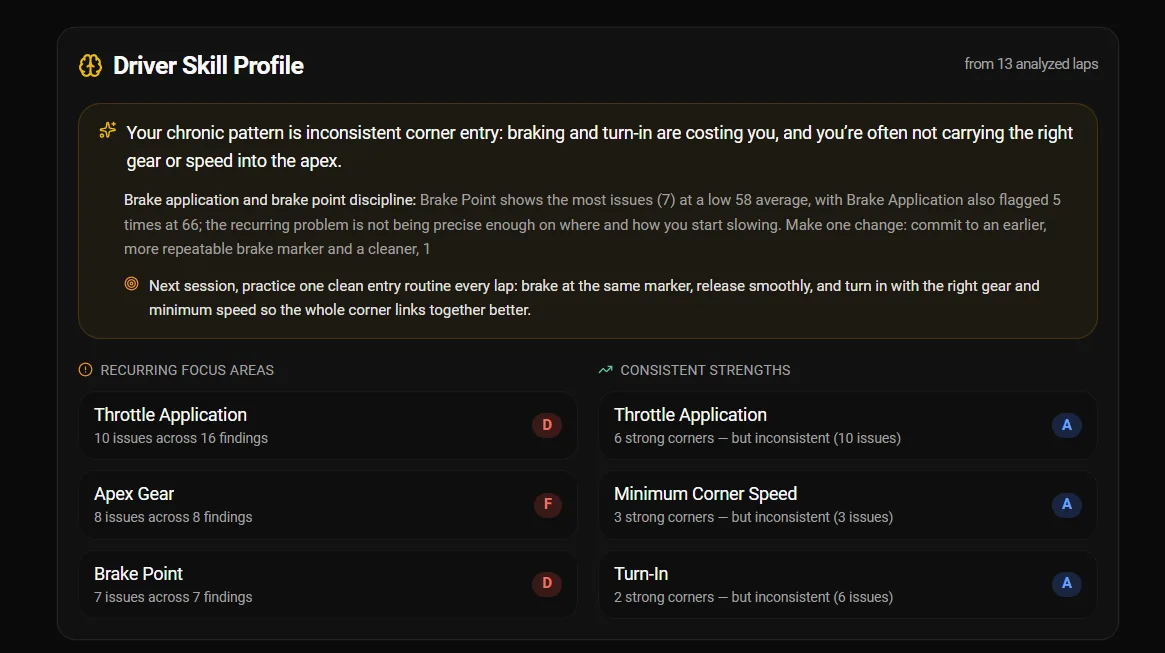
Hotlap.ai turns your analyzed laps into a skill profile: each fundamental — brake point, throttle application, turn-in, apex gear, minimum corner speed — is graded and split into strengths and the things to work on next. A driving style radar reads your telemetry across corners and names your archetype, so the AI coaches you within your style instead of against it.
- Per-skill grades built from real corner evidence
- Clear split between strengths and what to work on
- Driving style radar with your archetype, from late braking to smoothness
- Style-aware AI coaching that works with how you drive
- Skill trends that show whether practice is paying off
- Shareable on your public driver profile
AI racing coach, telemetry analyzer, and lap comparison tool in one app
Hotlap.ai is designed for drivers who want a direct answer after every iRacing session: where did the lap time go, what input caused it, and what should I change next? The platform combines telemetry traces, track maps, community references, and AI explanations without hiding the raw data serious drivers still need.
For iRacing practice
Find repeatable braking markers, compare best sectors, and learn why two laps with similar lap times feel different through the same corner.
For race preparation
Review tire behavior, compare previous laps, check consistency across a stint, and identify where conditions or traffic changed your rhythm.
For community benchmarks
Use leaderboards and reference laps to understand what faster drivers do differently in each car and track combination.
For driver improvement
Turn every session into a focused practice plan instead of guessing whether setup, line, brake release, or throttle timing caused the gap.
Feature-complete iRacing telemetry toolkit
A desktop and web workflow for importing iRacing telemetry, comparing laps, reviewing AI findings, and benchmarking against the Hotlap.ai community.
AI Coaching & Session Debrief
Get corner-by-corner grades with your numbers against the reference, overdriving and understeer detection, a per-session AI debrief, and coaching against community, personal best, or theoretical best references.
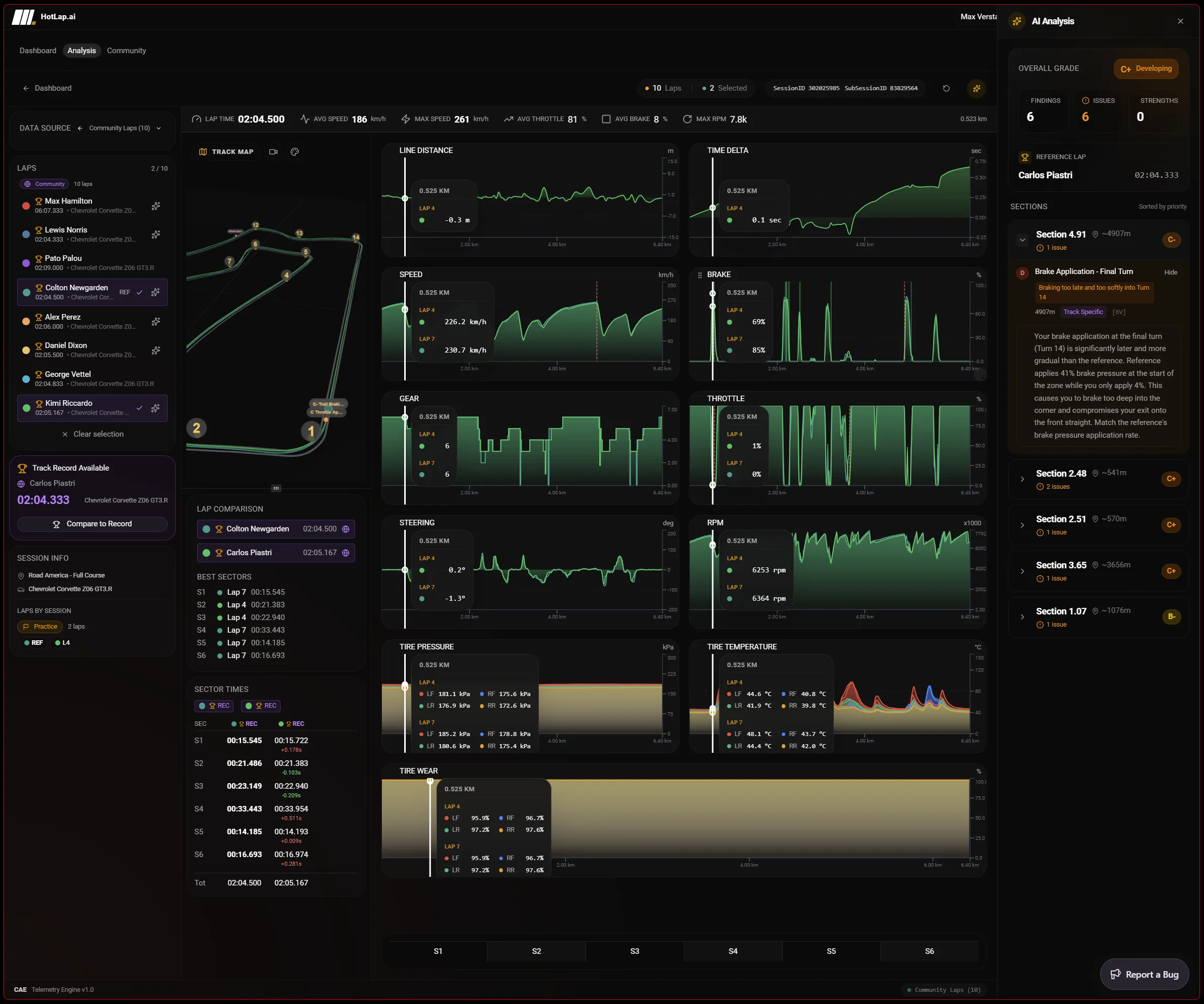
Multi-Lap Analysis Workspace
Compare local, cloud, community, or live laps with shared cursor, zoom, sector tables, lap stats, legends, and persistent draggable charts.
Full Channel Chart Suite
Review distance-aligned delta, speed, brake, throttle, steering, gear, RPM, tire temperature, tire pressure, and tire wear traces.
3D Track Maps — All 425 Tracks
Explore 3D maps for every official iRacing track with corner names, pit road, telemetry coloring, synced cursor, camera modes, and AI finding markers anchored to the corner.
Live Telemetry & AI Coach Overlay
Stream live speed, pedals, steering, gear, RPM, and tire temps while you drive — and get instant in-sim coaching after every lap with the corner costing you the most time.
Telemetry Library & Auto-Sync
Scan Documents/iRacing/telemetry, group sessions by car and track, hash files for duplicate detection, and sync uploads through a recoverable queue.
Community & Driver Profiles
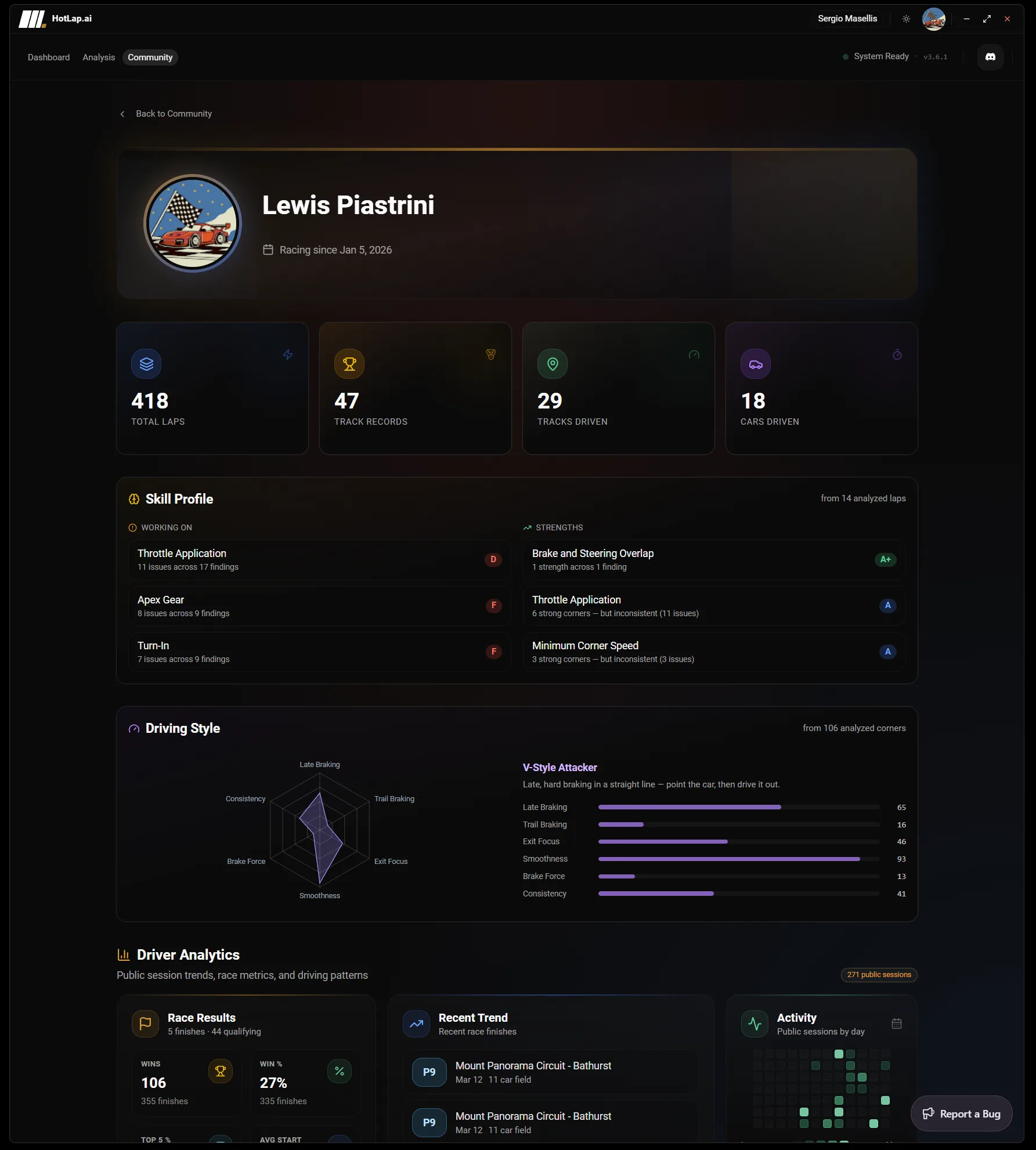
Study track records, car and track leaderboards, top drivers, and public profiles with skill grades, driving styles, sessions, activity analytics, and achievements.
Privacy & Preferences
Use email, Discord, Google, or iRacing OAuth flows with default-private uploads, auto-upload toggles, units, language settings, and desktop deep links.
Join the community.
Compare your performance against other drivers, climb the leaderboards, and track who is improving fastest.
Track records, car leaderboards, and driver rankings
Public profiles with skill grades, driving styles, sessions, and achievements
Community reference laps for side-by-side telemetry comparison
Learn how Hotlap.ai fits your sim racing stack
Go deeper on the parts of Hotlap.ai that matter most for finding lap time: telemetry import, AI coaching, lap comparison, 3D maps, live data, and community benchmarks. Each guide explains the workflow, the data behind it, and how to use it after an iRacing session.
Ready to hit the track?
Download the desktop app or open the web app. Start analyzing in seconds.
The web app runs on any platform. The desktop app is available for Windows.